


.png?width=50&height=50&name=feedbackfive-menu-icon(orange).png "feedbackfive-menu-icon(orange)")

Originally published on February 10, 2026, updated March 30, 2026
Menu
Join Our Email List
- Receive our monthly newsletter.
- Stay up to date on Amazon policies.
- Get tips to grow your business.
/%5BeComEngine%5DLogo-2019-linear.svg "eComEngine Logo")
 |
Review Monitoring Quickly identify review trends |
|
Review Monitoring Quickly identify review trends |

If inventory planning were a movie, “lead time” would be the character who shows up late, blames traffic, and somehow still expects you to be happy they arrived at all.
Reorder points aren’t about being perfect. They’re about being consistently prepared for supplier delays, promo spikes, seasonality, and the occasional “wait… why did sales triple yesterday?” surprise.
And the stakes are not small. Inventory distortion (out-of-stocks + overstocks) costs the global retail industry around $1.7T+ annually, a massive worldwide cost driver tracked by IHL Group.
Let’s fix your reorder points so they hold up in real life.
Put reorder points on autopilot in RestockPro
A reorder point (ROP) is the inventory level where you trigger replenishment so you don’t stock out before your next shipment is sellable.
Key phrase: sellable.
For Amazon FBA sellers, “lead time” isn’t just manufacturing + transit. It can include:
Your reorder point needs to cover all of that, plus a buffer for chaos.
Here’s the no-drama version:
ROP = (Average Daily Units Sold × Lead Time in Days) + Safety Stock
That’s it. That’s the engine.
Now let’s make it roadworthy.
Use a time range that reflects “normal” demand.
Average Daily Demand (ADD) = Total units sold in period ÷ Number of days
Tip: If you run frequent promos, calculate two averages:
If your supplier says “20 days,” and your last three POs took 28, 35, and 41 days to become sellable… your lead time is not 20 days.
Practical approach:
If you don’t have history yet, start with conservative assumptions and tighten over time.
Safety stock is inventory you keep because reality has a personality.
You have a few options here, depending on how fancy you want to get.
This one is perfect if you want something you can implement today in a spreadsheet:
Safety Stock = (Max Daily Demand × Max Lead Time) − (Avg Daily Demand × Avg Lead Time)
It protects you from:
If you know your variability, you can tie safety stock to a target in-stock rate (service level):
Safety Stock = Z × σ(during lead time)
Where:
If that sounds like a math textbook wearing a suit, don’t stress… Option A gets you 80% of the benefit with 20% of the effort.
Let’s say:
12 × 35 = 420 units
(20 × 50) − (12 × 35)
1000 − 420 = 580 units
ROP = 420 + 580 = 1,000 units
So you reorder when available inventory hits 1,000 units.
Is that conservative? Yes.
Is “going out of stock” expensive? Also yes. (Often way more expensive than holding some extra inventory.)
If Q4 is your Super Bowl, don’t use a quiet summer average to set a Q4 reorder point.
Practical play:
Promos should flip you into a different planning mode:
Start with:
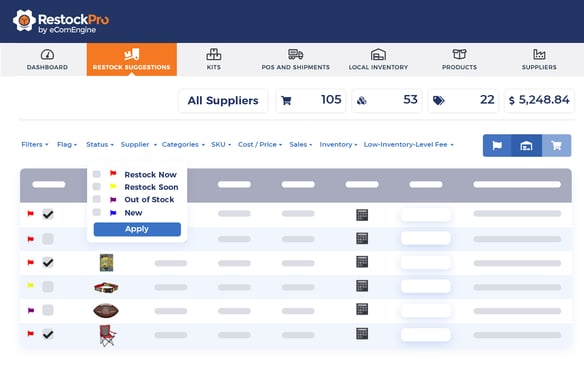
If your reorder point doesn’t include receiving/check-in time, it’s basically optimistic fiction.
Average demand is not a promise. It’s a midpoint.
You need a clean view of:
If your SKU’s demand shifts, your reorder point should too. Otherwise you’re driving while only looking in the rearview mirror.
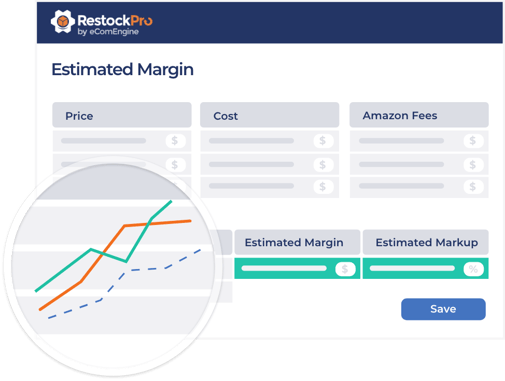
When reorder points are dialed in, inventory stops being a daily adrenaline sport.
You’re not guessing.
You’re not panic-ordering.
You’re not watching your Buy Box and ad performance get weird because you’re about to stock out.
You’re running a system.
Put reorder points on autopilot in RestockPro
Q: When is the best time to reorder inventory for Amazon FBA?
Reorder when your available inventory hits your reorder point—not when you “feel low.” Practically, that means placing a PO early enough to cover your full lead time + a buffer (production → transit → prep → FBA receiving/check-in). If you run promos or seasonality spikes, reorder before the spike starts… because reordering during the spike is how you audition for “stockout season.”
Put reorder points on autopilot in RestockProQ: How do I account for Amazon FBA receiving delays in my reorder point?
Treat FBA receiving/check-in as part of lead time, not an afterthought.
Do this:
Rule of thumb: If your shipments regularly take "a while" to become available, your reorder point should assume they'll take "a while" again, because Amazon is consistent like that.
Q: Should I include inbound inventory when calculating reorder point?
Yes, with one big caveat: only count inbound inventory you trust.
Use two numbers:
Be more conservative if:
Q: How much safety stock is enough for Amazon FBA?
There isn't one magic number… but there is a practical answer:
Better method: Calculate safety stock using the "worst-case" approach from the article so it reflects your variability, not a generic guess.
Q: What lead time should I use if my supplier is inconsistent?
Use real lead time, not promised lead time. If your supplier is inconsistent, set:
If you only use the average, you'll still stock out whenever the supplier runs late — basically "sometimes Tuesdays."
Q: How do I adjust reorder points for seasonality on Amazon?
Create seasonal reorder points (or at least seasonal demand inputs).
Easy approach:
If you sell holiday-heavy products, planning seasonality late is like buying concert tickets after the show starts.
Q: How do I handle reorder points during promotions (Prime Day, coupons, Deals)?
Use promo demand, not normal demand. Best practice:
Promos don't "cause" stockouts… planning like it's a normal week does.
Q: What's the difference between reorder point and reorder quantity?
You need both:
Q: How often should I recalculate my Amazon FBA reorder point?
Minimum: monthly
Better: weekly check-ins for fast movers, promo periods, or volatile supply chains.
Reorder points are NOT “set it and forget it.” They’re “set it and update it before reality updates you.”








No Comments Yet
Let us know what you think