


.png?width=50&height=50&name=feedbackfive-menu-icon(orange).png "feedbackfive-menu-icon(orange)")

Originally published on March 19, 2020, updated January 16, 2026
Menu
Join Our Email List
- Receive our monthly newsletter.
- Stay up to date on Amazon policies.
- Get tips to grow your business.
/%5BeComEngine%5DLogo-2019-linear.svg "eComEngine Logo")
 |
Review Monitoring Quickly identify review trends |
|
Review Monitoring Quickly identify review trends |

When Amazon introduced the Request a Review button, sellers asked for a way to automatically schedule these review requests.
We are happy to announce that you can use FeedbackFive to automatically deliver these same Amazon requests in 17 marketplaces. Since these messages are sent directly from Amazon to your buyers, you can be sure that they are always compliant with Amazon's guidelines.
FeedbackFive automates Amazon's "Request a Review" message so you don't have to click it manually. You choose which orders qualify and when to send (within Amazon's 5–30 day window). Amazon sends the message, so it's designed to stay compliant.

These requests also get serious results. In a random sample of over 1200 FeedbackFive users, average daily reviews increased 41% within 10 days of activating the Amazon Feedback and Review Request Template. Amazon agency Marknology shared that their clients are seeing an increase in positive ratings and a decrease in negative ratings with this feature.
Keep reading to find out how it works!
You can turn this on in under 2 minutes. Simply activate the new Amazon Feedback and Review Request Template with any FeedbackFive campaign to start sending these requests to your buyers. Here's how:
1. Go to Emails > Campaigns in FeedbackFive.
2. Select the Feedback and Review Request Template.
3. Modify the timing options and click Save.
4. Return to the Campaigns page and toggle the switch to "Active."
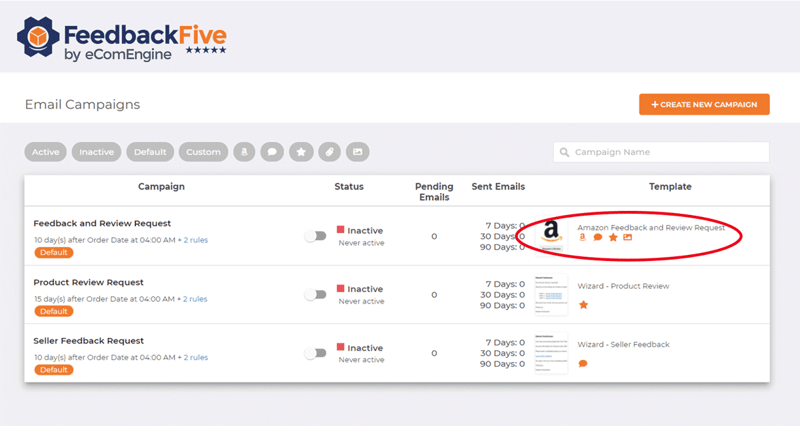
This is the closest thing to true 'set it and forget it' Amazon review automation!
Activate the template in 2 minutes (Free Trial) →Manually clicking Amazon’s Request a Review button works—but it’s also one more daily task competing with inventory, ads, support tickets, and… everything else.
Some browser extensions can help speed things up, but they still require you to keep coming back to trigger requests as more orders enter the 5–30 day eligibility window.
FeedbackFive is different because it’s true automation. Once your campaign is active, it continuously submits eligible orders to Amazon based on your settings—so your requests go out consistently without relying on you to remember (or babysit a browser tab).
With FeedbackFive, you also get extra control that extensions typically can’t match, including:
In other words: you set it once, and your review requests keep running in the background—automatically.
Amazon’s Request a Review button is a great tool… but there’s a big difference between using it manually and automating it with FeedbackFive.
Here’s the simplest way to think about it:
Using the button inside Seller Central works, but it comes with a few built-in realities:
Best for: Sellers with low order volume or who don’t mind the daily manual process.
FeedbackFive automates the same Amazon-generated request, without the repetitive clicking.
With automation, you can:
Best for: Sellers who want review growth that’s consistent, scalable, and hands-off.
| Feature | Manual Request a Review (Seller Central) | Automated Request a Review (FeedbackFive) |
|---|---|---|
| Time required | High (repeat clicking) | Low (set once) |
| Consistency | Depends on your schedule | Runs continuously |
| Tracks the 5–30 day window for you | ❌ No | ✅ Yes |
| Multi-marketplace support | Manual effort per marketplace | ✅ Centralized automation |
| Timing control | Limited | ✅ Choose day + hour |
| Order segmentation rules | ❌ No | ✅ Yes (ASIN, refunds, filters) |
Manual review requests work… when you remember to do them.
Automation works even when you’re busy, traveling, launching products, or stuck in the “Amazon chaos cycle.”
If you want the simplest system possible, the goal is pretty clear:
Let FeedbackFive automate the Request a Review message, so your reviews keep coming in while you focus on growth!
Next Step: Activate the Amazon Feedback and Review Request Template in FeedbackFive and start automating today.
FeedbackFive tells Amazon which of your orders to send requests for based on your campaign settings. These requests are submitted through a secure, authorized connection, and the message is sent directly from Amazon to your buyer.
Because these messages are sent outside of Buyer-Seller Messaging, there are a few important rules and limitations to keep in mind.
Amazon enforces the framework for these messages, which means:
FeedbackFive makes the process hands-off by automatically handling eligibility and submission:
This feature is available on Amazon: .com, .ae, .ca, .com.au, .com.br, .com.mx, .co.uk, .de, .es, .fr, .in, .it, .nl, .se, .sg, and .tr.
Here is an example of how the message looks in a buyer’s inbox:
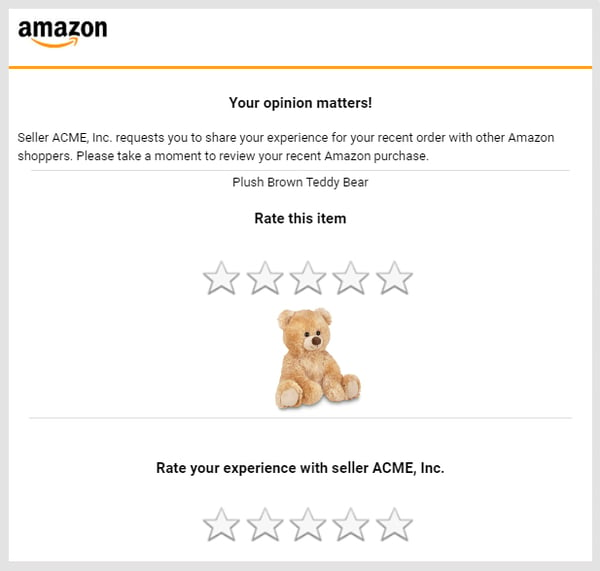
Since Amazon controls the content of the Request a Review email message and the eligibility for each order, you can continue to request reviews for your orders without worrying about violating any policies or guidelines. You also don't have to worry about whether the wording of your review request will be effective with your buyers. Amazon has optimized the content of the message based on its own email-to-review conversion data, so the end result is a message that is designed to get results while following Amazon’s rules about communicating with buyers.
Now let's make sure you're sending those requests at the right time, because timing can influence bot response rate and rating quality.
Amazon requires these requests to be sent within 5–30 days of delivery, but when you choose to send inside that window can make a real difference.
Here are a few simple guidelines to help you choose timing that fits your products:
Examples: household essentials, low-price items, everyday tools
✅ Send 5–7 days after delivery
Customers know quickly if it met expectations, and you’ll catch them while the purchase is still fresh.
Examples: electronics, skincare, supplements, durable goods
✅ Send 10–14 days after delivery
This gives buyers enough time to use it before they rate it.
Examples: holiday items, party supplies, giftable products
✅ Send 6–10 days after delivery
This increases the chance the buyer has actually opened/used it.
Examples: apparel, fit-based items, fragile products
✅ Send 14–21 days after delivery
Waiting a bit helps reduce requests landing on buyers who are still deciding to return or exchange.
If you’re unsure, start with 10 days after delivery for most products, then adjust based on results. FeedbackFive makes it easy to test timing without adding any manual work.

With this new feature, FeedbackFive removes the guesswork when it comes to requesting feedback and reviews and staying compliant with Amazon's policies. Simply set up your campaigns with the new template and let FeedbackFive automate your requests.Jay Lagarde
There are many benefits to using FeedbackFive to send this Amazon automated feedback request, especially if you occasionally have nightmares about violating TOS. Using the Request a Review button in Seller Central can be tedious and time consuming. There have been a few browser extensions that automate some of the Request a Review functionality. However, these types of solutions lack the security, flexible timing options, and true automation of FeedbackFive.
Long time Amazon sellers know that risks and rewards associated with product review gathering techniques are often buried deep, and take time to discover through trial and error. Consequently, approaching any new Amazon policy or functionality such as the new "Request a Review" button can be a real nail-biter. It was a relief, then, to learn that FeedbackFive added the automation of the "Request a Review" button to their feature set. Additionally, the helpful team at eComEngine published FAQs, blog posts, and held webinars to answer the myriad of questions we had for this new capability. Taking advantage of the flexible filtering and scheduling settings, guided by best-practices recommendations, we were able to start using the new "Request a Review" features far more quickly and more efficiently than otherwise possible. This level of quick action and seasoned expertise has been demonstrated year after year by the FeedbackFive team, in turn helping us to stay focused on offering exceptional products and services to our customers.
-Jack C., TekFX
With the browser extensions, you have to remember to keep coming back to submit requests as more of your orders fall into the 5-30 day eligibility window. With FeedbackFive, your campaigns will continuously submit requests as your orders come in allowing you to truly set it and forget it. FeedbackFive campaigns also allow you to exclude orders by ASIN as well as refunded orders. Timing options allow you to choose the exact hour of the day and which day within the 5-30 day window you want the request to be sent. You also have the ability to segment by multiple rules, such as to send the request to a specific ASIN ten days after delivery.
To understand the real impact of Amazon’s Request a Review automation, we reviewed performance across a random sample of 1,200+ FeedbackFive accounts using the Amazon Feedback & Review Request Template.
Get the same lift—automatically →*Note: Results vary based on factors like category, order volume, product lifecycle stage, and your existing review history, but the trend was consistent: sellers saw a noticeable lift shortly after activation.
In that sample, we saw a clear spike in review activity shortly after activation, followed by a higher ongoing daily average compared to pre-activation performance. Sellers also typically saw an improvement in the share of positive ratings received, likely because more happy customers were being consistently prompted at the right time.
And the best part? Once sellers turn it on, they tend to stick with it. Four years after this feature was announced, 77% of FeedbackFive users currently automate Amazon's Request a Review message.
Amazon agency Marknology also shared that their clients saw similar improvements after enabling the Amazon Feedback & Review Request Template in FeedbackFive. Because the request comes directly from Amazon, buyers are more likely to recognize it, trust it, and follow through, making it easier to capture more ratings without extra effort from your team.
In the next 2 minutes, you'll see how to turn this into a true set-it-and-forget-it system, without risking buyer messaging violations: Brushee Builds on its Success with FeedbackFive
Here at eComEngine, customer education is very important to us. We want to make sure that we are always providing clear and helpful information to help you grow your Amazon business. However, we know that sometimes it is difficult to stay up to date with various policies. (That’s why we try to make it easy for you!)

With this new feature, we are able to offer our sellers a secure and 100% compliant solution for requesting reviews and feedback at scale. It's a challenge for our customers to build their seller reputations while also deciphering all of the seller communication guidelines, so this is a positive step towards addressing both of those needs.Louis Mizzell
While you can still use FeedbackFive (and Amazon's API) to automate emails with Buyer-Seller Messaging, there is a lot of room for human error. If you violate Amazon’s Communication Guidelines, you may be restricted from sending messages to buyers for a period, typically around 30 days. We're excited to offer this feature that makes it easy for you to send 100% TOS compliant requests directly from Amazon with all the benefits of FeedbackFive’s messaging automation features.
For some sellers, it may make sense to adopt a hybrid approach by using the Amazon Feedback and Review Request Template for some products and a branded message for others. In this case, you’ll need to make sure that you’re only using one review request method per order.
No matter how you choose to send your review and feedback requests, it’s essential to make sure that all communication with buyers is compliant with Amazon’s policies. If you need help with Amazon Request a Review automation or anything else related to your ratings, our Customer Success Advisors are happy to answer any questions you may have.









No Comments Yet
Let us know what you think