


.png?width=50&height=50&name=feedbackfive-menu-icon(orange).png "feedbackfive-menu-icon(orange)")

Originally published on September 2, 2026, updated September 2, 2026
Menu
Join Our Email List
- Receive our monthly newsletter.
- Stay up to date on Amazon policies.
- Get tips to grow your business.
/%5BeComEngine%5DLogo-2019-linear.svg "eComEngine Logo")
 |
Review Monitoring Quickly identify review trends |
|
Review Monitoring Quickly identify review trends |

Most Amazon sellers manage PPC and inventory as two separate functions.
On one side, there’s the advertising account, with campaigns, bids, keywords, and ACoS targets. On the other side, there’s inventory, with reorder points, lead times, FBA storage limits, and restock suggestions.
These two functions are almost always handled independently. And that separation can destroy profitability for thousands of sellers.
The truth is that PPC and inventory aren’t separate problems. They’re the same problem viewed from two angles. A PPC decision made without inventory awareness can create stockouts, while an inventory decision made without PPC awareness creates overstock and wasted ad spend.
Either way, the seller loses.
This guide explains exactly how Amazon PPC affects your profitability and inventory planning—and what to do about it.
ACoS (Advertising Cost of Sale) is the metric most sellers use to evaluate PPC performance. The rule is pretty simple: keep ACoS below a target threshold, and the campaigns are considered healthy.
But ACoS alone is an incomplete measure of profitability because it doesn’t account for everything that affects your margin.
Consider a seller with the following economics:
A 30% ACoS looks healthy in the dashboard. But after factoring in storage fees, return rates, inbound shipping costs, and account management overhead, the actual margin on that sale may be closer to zero. Or worse, negative.
The sellers who understand their profitability don’t manage PPC to an ACoS target. Instead, they manage it to a profit-per-unit target, which requires knowing every cost that touches the product before a dollar reaches their bank account.
For most sellers running PPC, a meaningful portion of their ad budget is being wasted on:
This waste reduces profitability. Every dollar spent on a click that doesn’t convert is a dollar that could have funded a converting click, covered a storage fee, or contributed to a reorder.
To protect PPC profitability, adopt this systematic budget management:
To give you an example, for a seller spending $8,000 per month on advertising, reducing wasted spend by 25% through systematic optimization means $2,000 per month recovered—without changing a single product or adding a single ASIN.
When a PPC campaign is working, it is actively accelerating sell-through velocity. More sales per day means inventory depletes faster than historical data suggests it would.
The problem is that most inventory planning tools and reorder calculations are built on historical sales velocity. They look backward to project forward. When PPC performance improves suddenly, the historical baseline underestimates forward demand.
The result is a stockout. And stockouts don’t just cost lost sales. They cost organic ranking too.
The opposite scenario is equally expensive.
When a product isn’t converting well, some sellers respond by increasing PPC spend, hoping more traffic will solve the conversion problem. It rarely does. A listing with a conversion problem needs listing optimization, not more traffic. More traffic to a poorly converting listing just generates more clicks that don’t result in purchases.
Meanwhile, inventory continues to arrive at FBA, ordered based on projections that assumed PPC-driven demand that never materialized. Storage fees accumulate. Amazon’s low-inventory-level fees may apply if FBA stock drops too low relative to forecasted demand. If overstock sits long enough, aged inventory fees and forced liquidation become real considerations.
Your PPC account contains forward-looking demand signals that inventory planning tools built purely on historical data can’t see:
Amazon sellers who feed this forward-looking PPC data into their inventory planning decisions can reorder earlier, avoid stockouts during PPC-driven demand spikes, and reduce the overstock risk from campaigns that underperform.
Before optimizing any campaign, calculate your actual profit margin per unit:
This is the number your campaigns must beat to generate real profit. Managing to an ACoS target without knowing this number means you may be running profitable-looking campaigns that are actually destroying margin.
Before increasing ad spend or launching aggressive campaigns, confirm your current inventory position and lead time.
Ask yourself: if this campaign doubles my sales velocity, how many days of stock do I have left? If the answer is fewer than your supplier lead time plus FBA processing time, the campaign will cause a stockout before new inventory arrives.
Review your PPC impression and click trends weekly alongside your restock planning. Rising impressions on your top keywords—even before sales accelerate—signal that it’s time to trigger a reorder.
This forward-looking approach, combining PPC data with inventory forecasting tools, keeps you ahead of demand rather than reacting to stockouts after they happen.
Erratic sales velocity—caused by campaigns that spend heavily for short periods then pause, or bids that spike and collapse—creates inventory forecasting challenges. Restocking tools struggle to project demand from inconsistent data.
Consistent, well-structured campaigns that maintain steady spend and generate predictable daily sales velocity are not just better for PPC performance. They produce cleaner, more reliable data for inventory planning decisions.
Well-managed Amazon PPC campaigns create the kind of consistent, forecastable demand that makes every other aspect of operating an Amazon business easier to plan around.
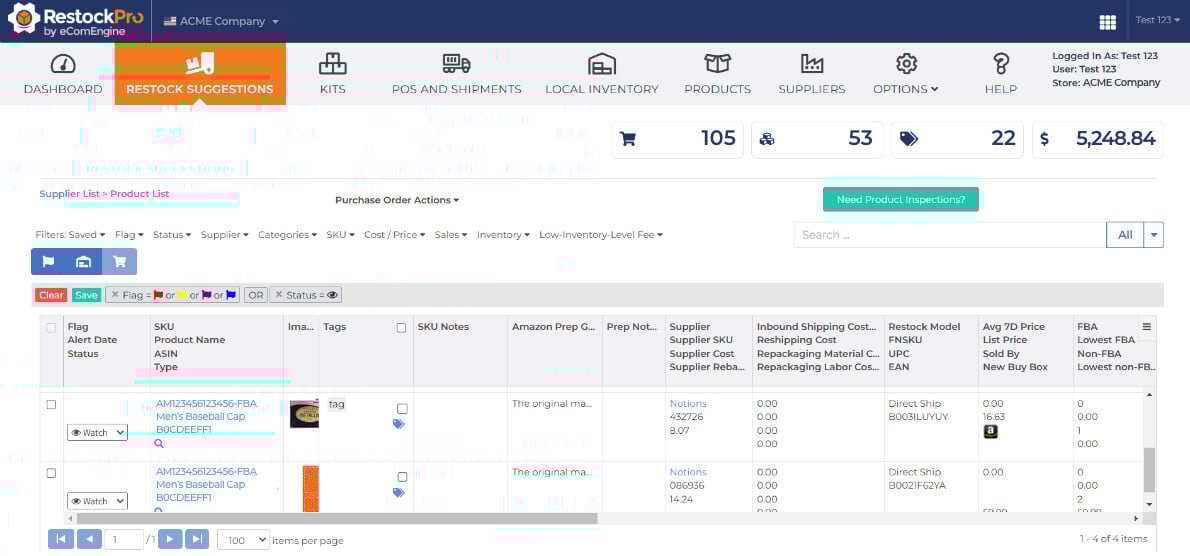
On the inventory side, tools like RestockPro analyze hundreds of data points to generate intelligent restock suggestions, flag at-risk SKUs before they hit stockout, and calculate margins in real time—so sellers can make inventory decisions faster and with more confidence.
On the review and listing health side, FeedbackFive and SellerPulse ensure that the traffic your PPC campaigns drive lands on listings that are protected, current, and converting.
Connecting both systems creates a feedback loop: PPC drives demand, inventory planning meets that demand, listing health protects conversion, reviews reinforce ranking, and the cycle compounds.
Amazon PPC can be a variable that directly affects sell-through velocity, organic ranking, margin per unit, and inventory requirements—simultaneously.
Sellers who treat PPC as an isolated function and inventory as a separate problem will always be reactive, scrambling to reorder after stockouts, writing off overstock from underperforming campaigns, watching margins erode from wasted ad spend they didn’t catch in time.
Sellers who connect these two functions can build a fundamentally more stable, more profitable Amazon business.
The connection isn’t complicated, but making it intentional changes everything.
Q: What is break-even ACoS and how do I calculate it?
Break-even ACoS is the maximum advertising cost of sale your product can sustain before the sale becomes unprofitable. Calculate it by subtracting all non-advertising costs (COGS, FBA fees, referral fees, storage, returns) from your sale price, then dividing the result by your sale price.
Q: How does PPC cause stockouts?
When a PPC campaign performs well, it accelerates your sell-through velocity beyond your historical baseline. Most inventory planning tools forecast demand using past sales data—which underestimates future demand when advertising is driving above-average performance. If you don’t account for this when placing reorders, inventory depletes faster than expected and you run out before new stock arrives.
Q: Should I pause PPC campaigns when my inventory is running low?
Yes, pausing or significantly reducing ad spend when stock drops to a critical level is usually the right move. Continuing to drive traffic to a product that is about to go out of stock wastes budget and can generate negative customer experiences if orders can’t be fulfilled promptly. Set an inventory threshold in your planning tool and create a rule to reduce PPC budgets when stock falls below it.
Q: What’s the best way to connect PPC management and inventory planning?
The most effective approach is to build a weekly review process where both functions are assessed together. Check PPC performance and impression trends at the same time you review restock suggestions and days-of-supply figures. When PPC shows accelerating demand, trigger reorders earlier. When inventory is tight, reduce aggressive bidding.






No Comments Yet
Let us know what you think