


.png?width=50&height=50&name=feedbackfive-menu-icon(orange).png "feedbackfive-menu-icon(orange)")

Originally published on October 19, 2026, updated October 19, 2026
Menu
Join Our Email List
- Receive our monthly newsletter.
- Stay up to date on Amazon policies.
- Get tips to grow your business.
/%5BeComEngine%5DLogo-2019-linear.svg "eComEngine Logo")
 |
Review Monitoring Quickly identify review trends |
|
Review Monitoring Quickly identify review trends |

Here’s an uncomfortable truth about selling on Amazon: the platform loses your stuff, dings you for damage it caused, and occasionally charges you fees for a box that is not the size it thinks it is. None of that is a scandal. It’s just physics at Amazon’s scale. Millions of units, thousands of trucks, a lot of forklifts.
The scandal is what happens next. Amazon now quietly reimburses some of it automatically, just enough to make you assume the whole thing is handled. It is not. The biggest buckets still land on you to catch, and the clock to claim them is shorter than most sellers realize.
Revenue is loud. Reimbursements are quiet. This is the money that never shows up as a win because you never knew it was missing. Twenty minutes, run before Q4 volume turns a trickle of discrepancies into a flood, is usually enough to find it.
A lost unit does not send you an email. A fee overcharge does not ping your phone. A customer return that gets refunded but never makes it back to your sellable stock just... disappears, politely, into the gap between two reports that do not talk to each other.
That is the whole problem in one sentence. The evidence of what Amazon owes you is real, but it is scattered across separate reports, none of which references the others, and all of which expire. Nobody is hiding it. Nobody is handing it to you either.
Industry audits suggest recoverable reimbursements run roughly 1% to 3% of annual FBA revenue for a typical seller. On a $2M business, that is real money sitting in a report you have not opened.
Late 2024 changed the rules. If you have not re-checked your assumptions since then, they are out of date.
For clean, single-event cases, a unit scanned as lost inside a fulfillment center, or obvious warehouse damage, Amazon increasingly issues a reimbursement without you filing anything. Good. That is a genuine improvement.
It is also a trap. Partial automatic credits create false confidence. You see a reimbursement hit your account, you assume the system is catching everything, and you stop looking. The automation covers a slice, not the pie.
These are the ones Amazon does not reliably catch, which means they are yours to find and file:
Customer returns that never came back. The buyer got refunded. The unit never re-entered your sellable inventory and was never marked lost. These claims are almost entirely seller-initiated.
Inbound receiving shortfalls. You shipped 500 units. Amazon checked in 480. The other 20 are a claim, not a rounding error.
Fee overcharges. Amazon measured your product as bigger or heavier than it is and billed the fee to match. Correctable, on its own claim path.
Removal and disposal losses. Removal shipments lost in transit, or inventory destroyed without notice or credit.
Multi-leg discrepancies. Units that go missing while being shuffled between fulfillment centers.
If your mental model is “Amazon handles reimbursements now,” every line above is money you are leaving on the table.
This is the part that turns a nice-to-do into a this-week.
The old 18-month lookback is gone. Most claim windows now sit around 60 days, and they start ticking from events you are not watching. Here is the shape of it:
Now connect that to Q4. Your Prime-into-Black-Friday-into-December volume is exactly when discrepancies spike, more units moving means more things to lose, damage, and mis-measure. It is also exactly when you are too busy to notice. If you wait until the January lull to “finally dig into reimbursements,” the 60-day clock has already run out on your heaviest-volume weeks. The money with the shortest fuse is the money you are least likely to be watching.
That is the case for doing this now, in a tight 20-minute pass, instead of someday.
You do not need a consultant for the first pass. You need three reports and a timer. The goal here is not to file everything today. It is to find the bleed and flag it.
In Seller Central, pull your Reimbursements report, your FBA customer returns report, and your inventory adjustments / ledger. Export them. These three are where most of the discrepancies live, and they are the ones that do not reference each other.
Scan the returns report for refunds where the unit never came back to sellable stock. Then scan inventory adjustments for lost or damaged events that do not have a matching reimbursement. Anything refunded-but-not-returned, or lost-but-not-credited, is a candidate. Mark it.
Spot-check a handful of your highest-volume SKUs. Does the fee Amazon is charging match the actual dimensions and weight of the product? A SKU that got re-measured wrong is quietly overcharging you on every single unit, which means it is both your biggest fee leak and your clearest claim.
Build a short list: SKU, discrepancy type, date, and your actual per-unit cost. That last column matters more than it looks, which is the next section. Do not batch-file 300 SKUs into one case. Blanket filings invite blanket denials. Flag the real ones and file them clean.
Run the audit with your real numbers.
Start a free SellerPulse or RestockPro Plus trial and pull accurate SKU-level cost and fee data before you open a single claim.
Finding the discrepancy is half the job. Getting paid the right amount is the other half, and this is where most sellers quietly lose again.
Since March 2025, Amazon values lost and damaged inventory reimbursements at your manufacturing or sourcing cost, not the sale price. Fair enough in principle. The catch: if your per-unit cost field in Seller Central is missing, zero, or wrong, Amazon substitutes its own internal estimate, and that estimate tends to run low. You get reimbursed. You just get reimbursed less than you are owed, and you never see the gap.
So the question that decides your payout is not “did I file?” It is “does Amazon know what this unit actually cost me?” If you do not know your true SKU-level cost cold, neither does Amazon, and it will round in its own favor.
Straight talk: these tools do not file claims for you, and they are not reimbursement services. Filing happens in Seller Central. What they do is make sure the audit above is accurate instead of a guess.
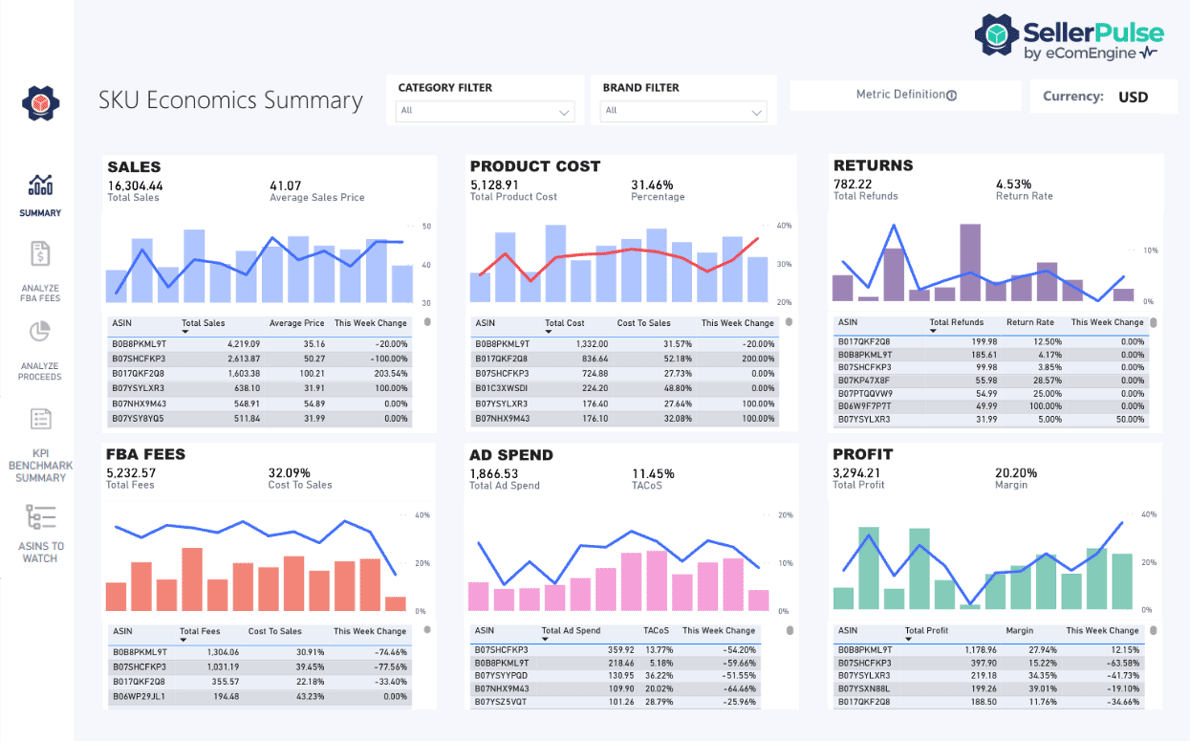
Put simply: Amazon reimburses on cost now. These tools are how you make sure your cost is right and your bleed is visible before the clock runs out.
Twenty minutes today beats a quarter of unclaimed discrepancies you find too late. Pull the reports, flag the bleed, and file with your real numbers.
Start Your Reimbursement Audit
Get accurate SKU-level cost, fee, and profit data so every claim you file pays out at the right number.
Q: What is an Amazon FBA reimbursement?
An Amazon FBA reimbursement is money Amazon owes you when it loses or damages your inventory, mishandles a customer return, or overcharges you on fees. It applies to units lost in fulfillment centers, warehouse damage, refunded returns that never restock, inbound shortfalls, and fee errors. Some cases are automatic, but many require you to file.
Q: Does Amazon automatically reimburse lost or damaged inventory?
Amazon automatically reimburses only a portion of lost and damaged inventory cases, typically clean, single-event warehouse losses. It does not reliably catch customer returns that never restock, inbound receiving shortfalls, fee overcharges, or removal losses. Those still require you to identify the discrepancy and file a claim yourself in Seller Central.
Q: How long do I have to file an FBA reimbursement claim?
Most Amazon FBA reimbursement windows now sit around 60 days. Fulfillment-center loss or damage claims are generally due about 60 days from when the issue is reported, and customer-return claims run roughly 60 to 120 days after the refund. The old 18-month lookback is gone, so timing matters.
Q: What FBA discrepancies can I claim a reimbursement for?
You can claim inventory lost or damaged in a fulfillment center, customer refunds where the item never came back, returns damaged in transit, inbound shipment shortfalls, fee overcharges from wrong weights or dimensions, and removal or disposal order losses. Each category has its own evidence and its own filing window.
Q: How does Amazon calculate my reimbursement value?
Since March 2025, Amazon values lost and damaged inventory reimbursements at your manufacturing or sourcing cost, not the sale price. If your per-unit cost data in Seller Central is missing or incorrect, Amazon uses its own estimate, which usually runs lower. Accurate SKU-level cost data protects your payout.
Q: Can SellerPulse or RestockPro Plus file reimbursement claims for me?
No. SellerPulse and RestockPro Plus are not reimbursement services and do not file claims. Filing happens in Amazon Seller Central. What they do is give you accurate SKU-level cost, fee, and profit data, so you can spot discrepancies and make sure each claim you file is valued correctly.
Q: How much money do sellers typically leave unclaimed?
Industry audits estimate that recoverable FBA reimbursements run roughly 1% to 3% of annual FBA revenue for a typical seller. Much of it goes unclaimed because automatic credits create false confidence, discrepancies are scattered across reports, and the short claim windows expire before sellers run an audit.
Don’t Let Q4 Bury Your Reimbursements
Every week you wait, another batch of discrepancies ages past its 60-day window. Run your audit with real SKU-level numbers so every claim pays out in full.









No Comments Yet
Let us know what you think