


.png?width=50&height=50&name=feedbackfive-menu-icon(orange).png "feedbackfive-menu-icon(orange)")

Originally published on July 27, 2026, updated July 27, 2026
Menu
Join Our Email List
- Receive our monthly newsletter.
- Stay up to date on Amazon policies.
- Get tips to grow your business.
/%5BeComEngine%5DLogo-2019-linear.svg "eComEngine Logo")
 |
Review Monitoring Quickly identify review trends |
|
Review Monitoring Quickly identify review trends |

Prime Day's over. The confetti's swept up. And now you're staring at a spreadsheet full of SKUs that either crushed it, limped through, or quietly embarrassed themselves in front of millions of shoppers.
Here's the thing: Amazon's Prime Day 2026 featured millions of deals across more than 35 categories, with new deals dropping as often as every five minutes during select periods. That's a lot of noise. A lot of spikes. A lot of "OMG this SKU is on FIRE" energy that may or may not survive contact with September.
Demand spikes move fast. Restock decisions shouldn't. Before you commit real cash to Q4 inventory, every SKU in your catalog needs to land in one of four buckets:
Scale. Fix. Watch. Stop Restocking.
This isn't a vibes-based sort. It's a data-based one — and we're going to walk you through exactly how to run it using the numbers you already have sitting in RestockPro and SellerPulse.
Start Your 30-Day Free TrialQuick gut check: if a SKU sold a lot during Prime Day, does that mean you should restock heavily for Q4?
Not necessarily. And this is where a lot of sellers get tripped up every single year.
Prime Day demand is artificially inflated by deep discounts, prime placement, and FOMO-driven urgency. Q4 demand is driven by different psychology — gifting, holiday timelines, and "I need this by December 20th or my mother-in-law will never let me hear the end of it." A SKU that moved fast at 30% off might move at a totally different (read: worse) rate at full Q4 price.
That's why the sort matters more than the spike.
| Bucket | What It Means | What You Do Next |
|---|---|---|
| Scale | Strong margin + strong demand + clean reviews | Increase reorder quantity, lock in supplier capacity |
| Fix | Good demand, but margin or reputation issues | Address the issue before committing more inventory |
| Watch | Inconclusive or thin data | Hold steady, gather more signal before Q4 |
| Stop Restocking | Weak margin, weak demand, or reputation risk | Let it sell through, don't reorder |
Let's break each one down.
These are the SKUs that earned their keep on every metric that matters: real profit margin (not just revenue), consistent sell-through, and a review profile that won't scare off holiday shoppers doing last-minute research.
This is where SellerPulse earns its spot in your workflow — it shows you the SKU economics behind the sales number, so you're scaling based on actual margin health, not top-line revenue that looks good until you subtract PPC spend, FBA fees, and returns.
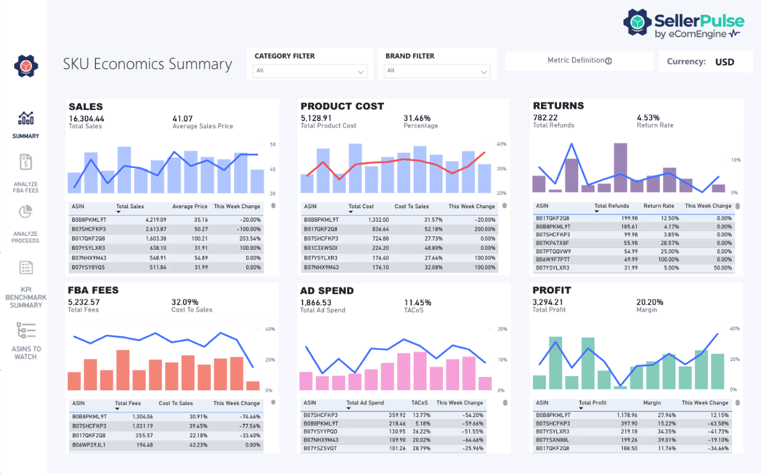
Once a SKU lands here, your next move is reorder timing. This is exactly the kind of decision RestockPro is built for: calculating reorder points and quantities based on lead times, seasonality, and sell-through velocity — so you're not scaling blind into Q4's longer shipping windows.
Q4 Reality Check
Lead times stretch in Q4. Suppliers get slammed. Freight costs climb. "Scale" doesn't mean "order a little more" — it means ordering early and enough, with buffer for the inevitable shipping delays that show up like clockwork every November.
This is the trickiest bucket, and also the most common. A Fix SKU usually has real demand — people clearly want it — but something underneath is leaking value: thin margins, a packaging issue triggering returns, or a reputation problem quietly tanking conversion.
Demand is solid, but fees, returns, or promotional costs are eating the profit. SellerPulse-level SKU economics will show you exactly where the leak is — sometimes it's a pricing issue, sometimes it's a packaging cost, sometimes it's a return rate quietly bleeding you dry.
Here's a scenario sellers underestimate constantly: a SKU can be profitable on paper and still be a liability heading into Q4 because of how it's perceived. If reviews are trending negative, response times are slow, or there's a pattern in feedback pointing to a fixable product issue (sizing confusion, unclear instructions, packaging damage), that SKU is going to underperform during the highest-scrutiny shopping season of the year.
This is exactly where FeedbackFive comes in. It automates your review and feedback requests so you're proactively building a stronger reputation signal — and it surfaces emerging patterns in customer sentiment before they snowball into a Q4 problem. If a SKU's reviews reveal a fixable issue (a product tweak, an updated listing image, clearer sizing info), that's a Fix, not a Stop. Fix it, then scale it next cycle.
The Fix Bucket Rule
If the underlying issue is fixable before your Q4 reorder deadline, fix it. If it's not fixable in time, it graduates to Watch or Stop.
Not every SKU gives you a clean signal. Sometimes Prime Day data is too thin, too new, or too weird (hello, one freak viral TikTok moment) to make a confident call.
The instinct here is to do something — reorder a little, just in case. Resist it. Watch means exactly that: hold your current position, keep monitoring SKU-level economics in SellerPulse, and let another data cycle (or two) clarify the picture before you commit Q4 inventory dollars.
A single anomalous data point is not a trend. Treat it accordingly.
This is the bucket nobody likes making decisions about, because it usually means admitting a SKU you believed in just isn't pulling its weight.
Here's the nuance that matters: Stop Restocking doesn't mean stop selling. Let existing inventory sell through naturally. Don't dump it, don't panic-discount it into oblivion — just stop pouring new capital into a SKU that's not earning its shelf space.
This is also where FeedbackFive's reputation data becomes a genuine decision-maker, not just a nice-to-have. If feedback patterns point to something structural rather than fixable, that's your signal to redirect Q4 budget toward SKUs in your Scale and Fix buckets instead.
Freed-up capital is the real win here. Every dollar you don't sink into a dying SKU is a dollar available for the SKUs that are actually going to perform during your highest-revenue quarter of the year.
If you ran the Profit-First SKU Audit after Prime Day, you already have the raw data. This four-bucket sort is what turns that audit into an actual decision-making framework — not just a spreadsheet full of numbers you nod at and then ignore.
This bucket sort is also exactly the groundwork you need for full Q4 inventory planning — which we'll dig into next month, including how to set reorder timing around shipping delays, freight surges, and the holiday lead-time crunch that catches sellers off guard every single year.
Q: What's the best way to decide which Amazon SKUs to restock before Q4?
Sort each SKU into one of four categories: Scale (strong margin and demand), Fix (good demand but a margin or reputation issue), Watch (inconclusive data), or Stop Restocking (weak margin, weak demand, or unresolved reputation risk). Base the sort on actual SKU-level profit data, not just sales volume.
Q: Does strong Prime Day performance mean a SKU is safe to restock heavily for Q4?
Not automatically. Prime Day demand is often inflated by deep discounts and time-limited urgency, which doesn't always reflect how a SKU will sell at full Q4 pricing. Sellers should verify margin and sell-through trends beyond the promotional window before committing to a large Q4 reorder.
Q: How do product reviews affect restocking decisions?
Review sentiment can reveal problems that profit-and-loss numbers alone won't show, such as sizing confusion, packaging damage, or quality complaints. A SKU with solid margin but declining review sentiment often belongs in the Fix bucket rather than Scale, since reputation issues tend to suppress conversion during high-traffic shopping periods like Q4.
Q: What does "Stop Restocking" mean if a SKU is still generating sales?
Stop Restocking means halting new inventory orders, not pulling the product from sale. Sellers let existing stock sell through naturally while redirecting Q4 budget toward SKUs with stronger margin and demand performance.
Q: How far in advance should Amazon sellers place Q4 reorders?
Lead times typically lengthen in Q4 due to higher supplier demand and freight congestion. Sellers should calculate reorder points using historical lead time data and build in extra buffer time compared to non-peak months, rather than relying on standard reorder timing.
Q: What's the difference between a "Fix" SKU and a "Watch" SKU?
A Fix SKU has a clear, identifiable problem, such as a margin leak or a fixable reputation issue, that can realistically be resolved before the Q4 reorder deadline. A Watch SKU simply lacks enough reliable data to make a confident call yet, often due to limited sales history or an unusual, one-off performance spike.
Q: Can a SKU move between buckets over time?
Yes. A SKU classified as Fix in July could move to Scale in August once the underlying issue is resolved, or shift to Stop Restocking if the problem turns out to be structural rather than fixable. The four-bucket sort is meant to be revisited each inventory planning cycle, not treated as a one-time decision.






No Comments Yet
Let us know what you think