
Provide Information So We Can Create Your Account
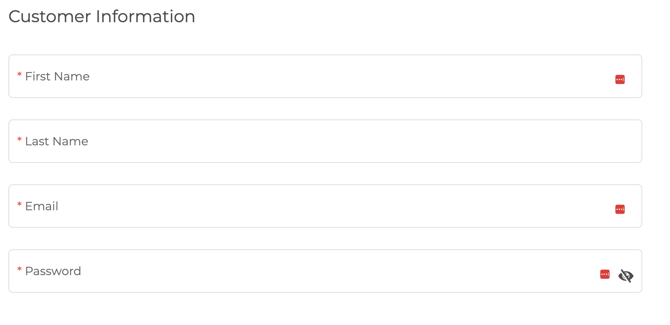
- Enter your first and last name and the email address you would like to use to log into FeedbackFive or SellerPulse. (This should be an email that you check regularly in case we need to get in touch with you about your account.)
- Create a password. Passwords must contain at least one lowercase and one uppercase letter and one non-alpha character (a number or a symbol).
Choose the Application For Your Trial
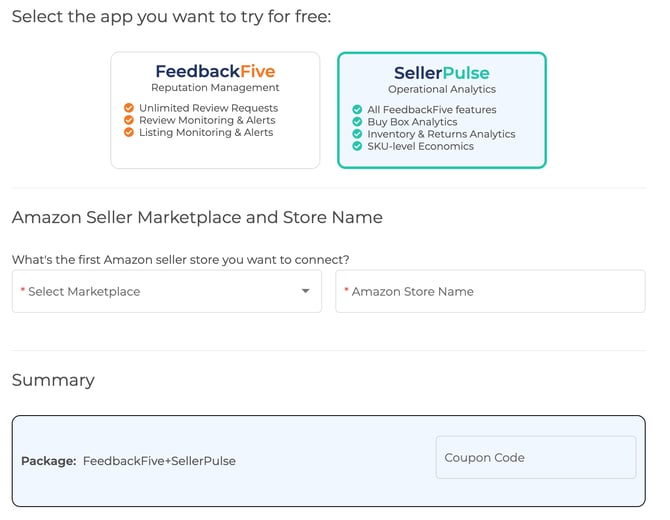
- Select whether you want to try just FeedbackFive or FeedbackFive + SellerPulse (bundle) during your free trial.
- FeedbackFive helps Amazon sellers automate customer messaging to collect more product reviews and seller feedback—while staying compliant with Amazon policies. Use it to protect your seller reputation, increase review volume, and quickly resolve customer issues before they impact your account health.
- SellerPulse gives Amazon sellers clear, actionable insight into profitability and key business KPIs across products and time. Use it to understand what’s really driving profit, spot issues early, and make smarter operational decisions with confidence.
- Enter the store name and marketplace for the first store you want to add to your account. You'll be able to add the others later.
- The store name should be the title of your store as it appears on Amazon (NOT the link to your storefront).
- On regular FeedbackFive plans, you can only add one store per marketplace. If you need to add more than one store for the same marketplace (e.g. two .com/US stores), you may reach out to us for other plan options.
- If you received a coupon code, enter it in the Coupon Code box field in the Summary section..
Add Your Credit Card Details
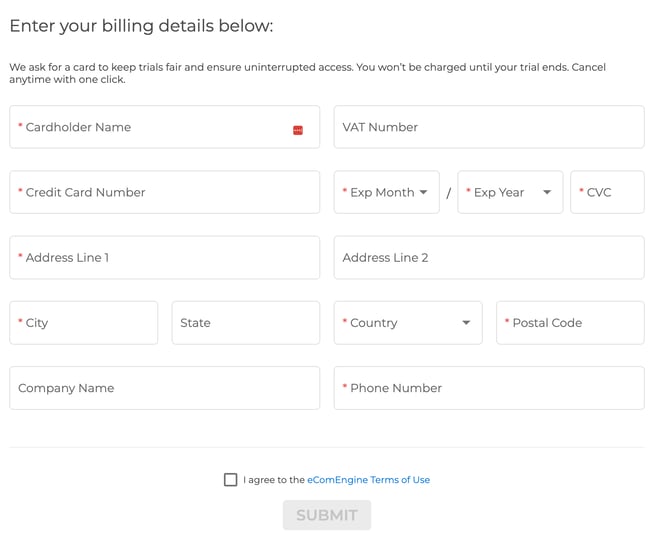
- Enter your credit card information. Your card will be charged automatically at the end of your free trial, based on the number of orders your store received in the last 30 days.
- If you do not see an option to enter credit card information, this means that you already have a different subscription with eComEngine, such as RestockPro. We'll just use that billing information automatically when needed.
- The VAT field is optional and normally used only by sellers based in Europe.
- Note, we ask for a credit card to keep trials fair and ensure uninterrupted access. You won’t be charged until your trial ends. Cancel anytime in one click.
- Check the box to agree to eComEngine's Terms of Use.
- Click SUBMIT.
Congratulations! You now have a FeedbackFive account and store.
Next, see our Quickstart Guide to set up your account!