
RestockPro Plus combines inventory management with SKU-level profitability insights, helping you decide what to restock, where to invest, and which products need attention. RestockPro helps you forecast demand, create restock suggestions, manage purchase orders and shipments, and track inventory throughout your supply chain. RestockPro Plus adds SKU Economics Reports and SKU Economics KPI and Benchmark Reports, so you can consider both inventory needs and financial performance when making replenishment decisions.
Manage Your Inventory and Supply Chain
RestockPro provides the tools you need to manage your Amazon FBA inventory, including:
- Restock suggestions that help you determine what to order, how much to order, and when
- Purchase order and shipment management
- Visibility into inventory at your supplier, local warehouse, in transit, and at Amazon
- FBA label printing
- Tools for managing bundles and multipacks
These capabilities help you avoid stockouts, reduce excess inventory, and keep your replenishment process organized.
Learn more in the Introduction to RestockPro.
RestockPro Plus: Understand the Economics of Your SKUs
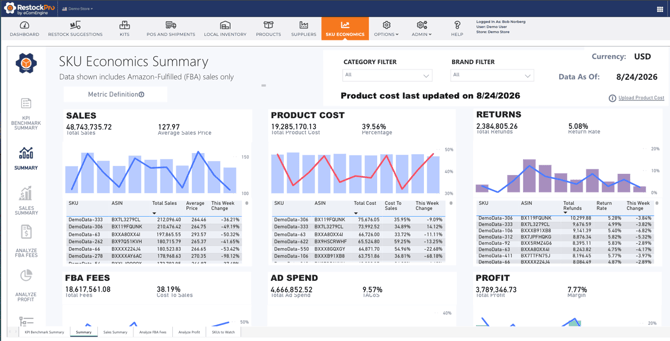
The SKU Economics Reports show how sales, product costs, returns, FBA fees, and advertising spend affect profitability across your catalog.
You can use these reports to:
- Review profitability across your business or by product
- Compare sales and costs over a rolling 12-week period
- Identify which costs are reducing profitability
- Analyze FBA fees by product, fee type, and week
- See how profits and margins change over time
- Find high-performing and underperforming products
This visibility helps you look beyond sales velocity and understand whether a product is producing enough profit to justify additional inventory investment.
Learn more about the SKU Economics Reports.
RestockPro Plus: Compare Performance Against Benchmarks
The KPI Benchmark Summary helps you quickly assess your business by comparing key financial KPIs with default or custom benchmarks.
The report tracks:
- Sales growth
- Product cost as a percentage of sales
- Return rate
- FBA fees as a percentage of sales
- TACoS
- Profit as a percentage of sales
- ROI
- Weekly sales velocity
- Weekly net proceeds velocity
You can review both 12-week averages and weekly results to see whether performance is improving, declining, or remaining consistent.
Know Which SKUs Need Attention
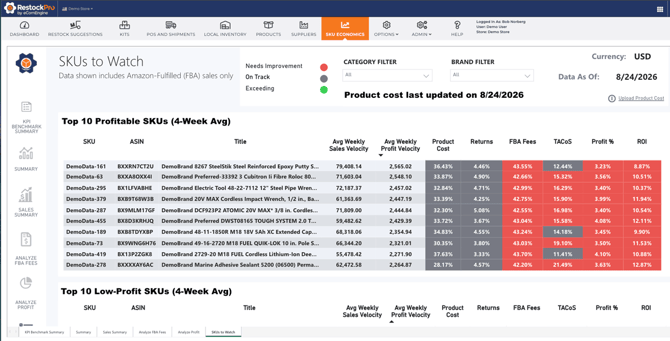
The SKUs to Watch Report helps you focus your analysis by highlighting:
- Your most profitable SKUs
- Your lowest-profit SKUs
- SKUs with high FBA fee percentages
- SKUs with high return rates
- SKUs with high TACoS
When a SKU needs further investigation, you can review detailed information about its FBA fees, return reasons, TACoS, and benchmark trends. These insights can help you decide whether to adjust pricing or advertising, improve a listing or product, change your inventory investment, or phase out a low-performing item.
Learn more about the KPI Benchmark Summary and SKUs to Watch Reports.
RestockPro Plus: Make Better Replenishment Decisions
RestockPro Plus brings inventory planning and profitability visibility together. Before committing more cash to a product, you can consider:
- Do I need more inventory?
- How quickly is the product selling?
- Is the product profitable?
- How does its performance compare with my benchmarks?
- Are fees, returns, advertising, or product costs reducing its return?
- Is this the best use of my available inventory budget?
By answering these questions together, RestockPro Plus helps you protect in-stock availability, avoid tying up cash in weaker products, and direct more of your inventory investment toward products with stronger financial performance.